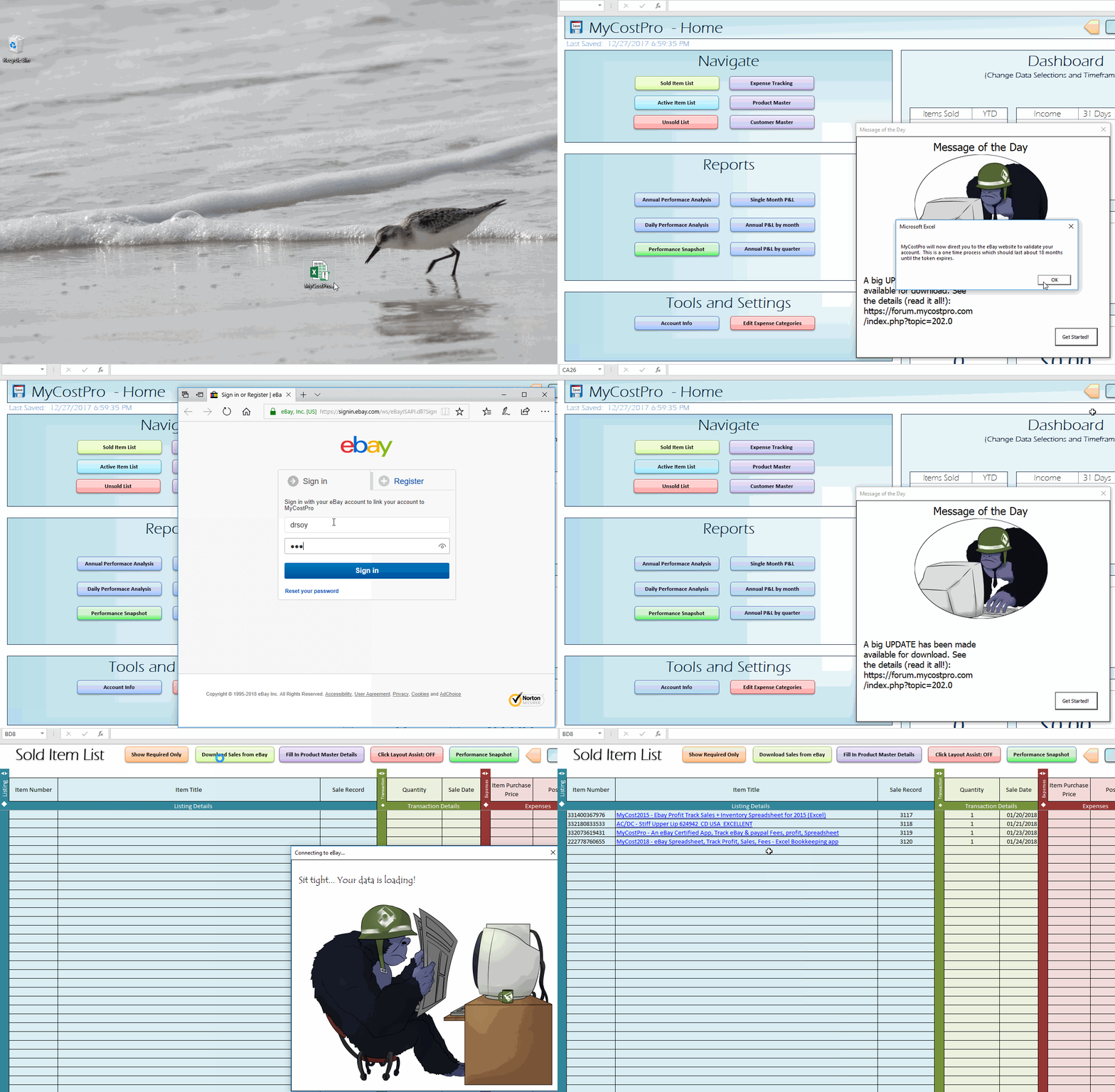
Here are the basic steps to get started after you download MyCostPro:
- If you haven’t figured out how to purchase or download MyCostPro, see the Purchase and Download Tutorial first!
- Locate the MyCostPro.xlsm file you downloaded from the download page and double-click to launch it in Excel
- The spreadsheet will popup a security warning on first use. Click the “Enable Content” button on the security warning ribbon to enable macros (and to allow all of the cool features to work)
- The spreadsheet will enter full-screen mode after enabling macros and a “Message of the Day” popup will display “Connecting…”
- After a few seconds, a welcome message will appear, along with a text field labelled “Download Key”
- Check your PayPal email address for a welcome email from MyCostPro (you may need to check junk), and copy the download code from the email using the keyboard command ctrl-c
- Paste the download code into the “Download Key” text field in MyCostPro using the keyboard command ctrl-v and click the “Input Key” button
- The message of the day will then display in the popup, and after a few seconds, another popup will display on top
- This new popup informs you that you will be directed via web browser to the eBay website to validate your account. This is a step that will need to be completed every 18 months. Click the “OK” button to dismiss the new dialog
- A web browser will then appear with an eBay sign-in dialog. Sign into the eBay account you want associated with MyCostPro
- Click the “Agree” button to accept eBay’s terms and allow MyCostPro to connect to your account
- Close the web browser
- Click the “Get Started” button to dismiss the message of the day popup in MyCostPro
- If you purchased a multiple eBay account subscription, Check the instructions here for configuring your secondary accounts
- You are now able to use all the features of MyCostPro!
- You can click the “Sold Item List” button followed by the “Download Sales from eBay” button on the next screen to download sales information from eBay
- The animated gif below will step you through this process visually
- There are many more features of MyCostPro to explore, so be sure to check out our video tutorials for more!